- Recent Enhancements
- Introduction
- Prerequisites
- Workflow
- Monitoring
- Opinions
- TODO
- Dependencies
- References
- FAQ
Major version upgrade from 24.0.1 to 26.4.4 with production-tested configuration:
- Modern Proxy Configuration: Updated from deprecated
KC_PROXY=edgetoKC_PROXY_HEADERS=xforwarded - Enhanced Monitoring: Built-in health (
/auth/health) and metrics (/auth/metrics) endpoints - Improved Health Checks: ALB health check path updated to reliable
/auth/realms/masterendpoint - Database Requirements: PostgreSQL 13+ for compatibility
- Zero-Downtime Support: JDBC_PING clustering for seamless upgrades
See CLAUDE.md for detailed upgrade notes and breaking changes.
Complete OAuth 2.1/OIDC infrastructure for Model Context Protocol (MCP) servers:
- Dynamic Client Registration (DCR): RFC 7591 compliant, enabling Claude Code, Cursor, and VS Code integration
- Audience-Based Authorization: RFC 8807 resource indicators with automatic JWT
audclaim injection for MCP server authentication - PKCE Enforcement: S256 code challenge for secure public client flows
- Automated Deployment: One-command deployment (
make deploy) with integrated DCR policy configuration - Comprehensive Documentation: Complete setup guide in environments/template/mcp-oauth/
Key Features:
- Realm default scopes auto-configuration (DCR clients inherit
mcp:runscope) - Anonymous DCR support (no trusted hosts restrictions for cursor://, vscode:// URIs)
- Audience protocol mapper for seamless MCP server integration
- Complete test suite for validation
Quick Start:
# Recommended: Semi-automated setup
cd environments/<env-name>/mcp-oauth
./init-from-parent.sh --mcp-server-url "https://your-mcp-server-url/mcp"
make deploy

# Alternative: Manual configuration
cp terraform.tfvars.example terraform.tfvars
vim terraform.tfvars  # Set keycloak_url, admin password, MCP server URL
make deploy
Complete Guide: See environments/template/mcp-oauth/README.md for:
- Configuration value sources and retrieval methods
- Deployment steps and script execution order
- Troubleshooting and testing procedures
Recent enhancements ensure robust production deployments:
- Health Check Reliability: Fallback to
/auth/realms/masterprevents false negatives during startup - Monitoring Enabled:
KC_HEALTH_ENABLED=trueandKC_METRICS_ENABLED=trueby default - Container Optimization: Fixed build-time vs runtime configuration consistency
- Path Normalization: Updated handling for HTTP requests with
..or//sequences - Automated MCP OAuth Configuration: Deploy script automatically configures Keycloak realm for MCP server authentication
NOTE: I spin releases for the latest Keycloak versions avoiding "dot ohs" e.g. 15.1.1+ but not 15.1.0.
Opinionated infrastructure and deployment automation for Keycloak on AWS Fargate with MCP OAuth 2.1 integration for MCP server authentication.
- Batteries included (network plumbing + container build/deploy) 🚀
- MCP OAuth 2.1 ready (DCR, PKCE, audience-based authorization for MCP servers) 🔐
- Tested with latest Terraform 😍
- Prefer fully-managed backing services (Fargate, Aurora, CloudWatch) 🥱
- JDBC clustering and cache replication (improved HA) 🤙
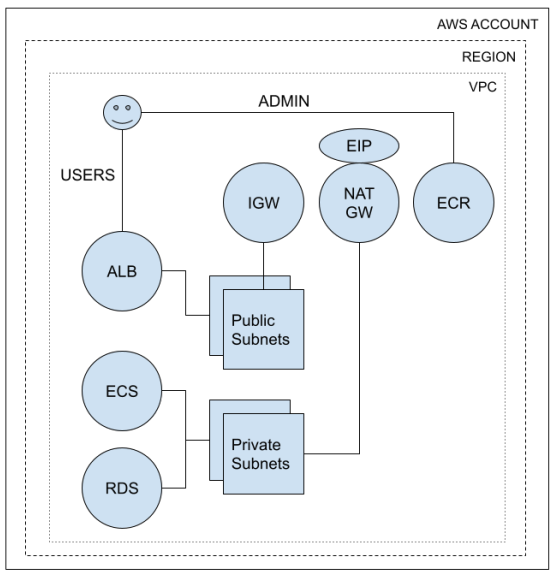
NOTE: The diagram shows the default self-contained publicly-accessible service leveraging the included network module. You can also deploy an internal service (no Internet connectivity) or public service that uses your own network infrastructure. See terraform.tfvars for examples of how to select the right approach for your needs. When deploying to your own network infrastructure, read over the network module to understand how to configure network components.
Psst: Need IaC for your Keycloak clients?
- aws v2 CLI
- Docker (container build/deploy)
- UNIX-like OS (tested on Linux and MacOS)
The basic workflow relies on make to reduce typing toil. If you are just getting started, refer to the bootstrapping guide.
# Step 1: Create infrastructure with desired_count = 0
$ cd environments
$ ./mkenv -e <env_name>
$ cd <env_name>

# Edit terraform.tfvars and set:
# desired_count = 0  # Prevents ECS from trying to start tasks before ECR has image

$ make all

# Step 2: Build and push Keycloak container image
$ cd build
$ export AWS_REGION=<your_region>
$ make all ENV=<env_name>

# Step 3: Start ECS tasks
$ cd environments/<env_name>

# Edit terraform.tfvars and set:
# desired_count = 2  # Now start the desired number of ECS tasks

$ make update

# Step 4: (Optional) Configure MCP OAuth realm for Claude Code/Cursor/VS Code
$ cd environments/<env_name>/mcp-oauth

# Option A: Semi-automated setup (Recommended)
$ ./init-from-parent.sh --mcp-server-url "https://your-mcp-server-url/mcp"
$ make deploy

# Option B: Manual configuration
$ cp terraform.tfvars.example terraform.tfvars
$ vi terraform.tfvars  # Set keycloak_url, keycloak_admin_password, resource_server_uri (MCP server URL)
$ make deploy

# Once complete, MCP clients will discover and authenticate with your Keycloak realm
# See environments/template/mcp-oauth/README.md for detailed configuration guide
$ cd environments/<env_name>
$ vi terraform.tfvars # edit as needed...
$ make update
$ cd environments/<env_name>
$ make destroy
# type 'yes' to confirm
NOTE: Once deployed, Keycloak will be accessible via <yourdomain>/auth.
Due to this breaking change
there is no longer an automatic redirect from / to /auth. Neither the provided
environment variable nor build flag restore prior behavior as expected (I consider
this a bug). I may update the ALB configuration to add this back, but have not
done so yet. I welcome feedback on preferred approaches.
Since monitoring approaches vary, I've avoided codifying monitoring-specific opinions to avoid adding cost and complexity. In combination with external synthetics and metrics, you may want to extend this with sidecar containers to provide enhanced monitoring. An example of how to do that with Datadog is included for reference. When adding sidecars, you will need to adjust CPU and memory reservations appropriately. For Datadog, you need to reserve an additional 256 CPU units and 512MB of memory.
Similar to popular frameworks, bootstrap time is reduced by encapsulating technical opinions. This gets functional infrastructure online quickly and consistently. However, you can easily adjust these as needed. This section calls out key design choices.
The Keycloak module itself wraps only a few AWS Terraform primitives, preferring trusted registry modules. Avoiding bespoke solutions where community-tested options exist improves quality and reduces maintenance overhead.
We have contributed to many of these modules ourselves, and leverage them for production infrastructure. We've taken the time to read the module source, understand how they work, and reason about the choices they've made. You should do the same. Dependencies are conveniently linked in References.
While there are a number of modules to create AWS network resources, networking is an exception to the re-use rule above. The provided network module is simplistic, but adequate and easy to adjust based on your requirements.
It is meant to serve two purposes: a starting point to get new environments online quickly, and interface documentation. Taking it's outputs as an example, you can easily provide similar inputs via configuration from existing infrastructure or a module of your choice.
Whether ALB listeners, ECR, RDS, or remote state... anything that can have encryption enabled does by default. Aside from belief in the cypherpunk motto, this is due to the fact Keycloak is a security service.
The one exception today is intra-VPC traffic between the ALB and ECS containers. Fixing this so service traffic is FULLY encrypted is on the TODO list (PRs welcome).
Aside from just "turning it on", thought is being given to cert management, workflow, etc. For example, a sidecar proxy integrated with Let's Encrypt would be more up-front complexity but not require updating container trust stores, worrying about renewals, etc.
Upstream defaults are used when sensible. Settings unlikely to change in the typical case have local defaults or are hard-coded (e.g. DB port number). The goal is to reduce cognitive load, but these are only opinions that you can override.
The included standalone-ha.xml and docker-entrypoint.sh have been adjusted to work with ECS out of the box. These should generally suffice, but may need adjusted based on your requirements. You might also want to toggle different feature flags, which are controlled in profile.properties.
- Terratests
- ALB -> ECS TLS
- Performance test automation + baseline
- Multi-region support
- MySQL support
- https://github.com/cloudposse/terraform-aws-tfstate-backend
- https://github.com/cloudposse/terraform-null-label
- https://github.com/cloudposse/terraform-aws-alb
- https://github.com/cloudposse/terraform-aws-ecs-alb-service-task
- https://github.com/cloudposse/terraform-aws-ecr
- https://github.com/cloudposse/terraform-aws-rds-cluster
- https://hub.docker.com/r/jboss/keycloak
- https://www.keycloak.org/docs/latest/server_installation/index.html
- https://www.keycloak.org/docs/latest/upgrading/index.html
- https://docs.datadoghq.com/integrations/ecs_fargate
- https://docs.datadoghq.com/integrations/faq/integration-setup-ecs-fargate
- https://docs.datadoghq.com/agent/guide/autodiscovery-with-jmx
Abandon hope all ye who enter here... :-)
- https://www.keycloak.org/docs/latest/server_installation/index.html#_clustering
- https://infinispan.org/docs/stable/index.html
- https://www.keycloak.org/2019/05/keycloak-cluster-setup.html
- https://www.keycloak.org/2019/08/keycloak-jdbc-ping
- http://jgroups.org/manual/#JDBC_PING
- https://octopus.com/blog/wildfly-jdbc-ping
Q: The target group with targetGroupArn <arn> does not have an associated load balancer.
A: This is rare, but if it happens to you just re-run make all (double apply), perhaps waiting a few minutes in between.
Q: How do I configure OAuth authentication for my MCP server with Keycloak?
A: See the complete setup guide in environments/template/mcp-oauth/. The infrastructure supports Dynamic Client Registration (DCR) for MCP clients out of the box - simply copy the template to your environment, configure your MCP server URL, and run make deploy. MCP clients like Claude Code will automatically discover and register with your Keycloak realm.
Q: Why is my ALB health check failing after upgrading to Keycloak 26.4.4?
A: Keycloak 26.4.4 requires KC_HEALTH_ENABLED=true for the /auth/health endpoint. The updated configuration uses /auth/realms/master as a reliable alternative health check path. For existing deployments, either update your Target Group health check path or redeploy with the latest container configuration that includes KC_HEALTH_ENABLED=true.
Q: What Keycloak version is currently supported?
A: Keycloak 26.4.4 (upgraded from 24.0.1 in November 2024). This version requires PostgreSQL 13+ and includes important security and performance improvements. See CLAUDE.md for detailed upgrade notes.
Q: How do I get support?
A: Open GitHub issues. If there's a bug you know how to fix, also open a PR and link it in your issue.