The streaming JSON parser for AI applications




Parse JSON reactively as LLM responses stream in. Subscribe to properties and receive values character-by-character as they're generated—no waiting for the complete response.
- The Problem
- The Solution
- Quick Start
- How It Works
- Feature Highlights
- Complete Example
- API Reference
- Robustness
- LLM Provider Setup
- Contributing
- License
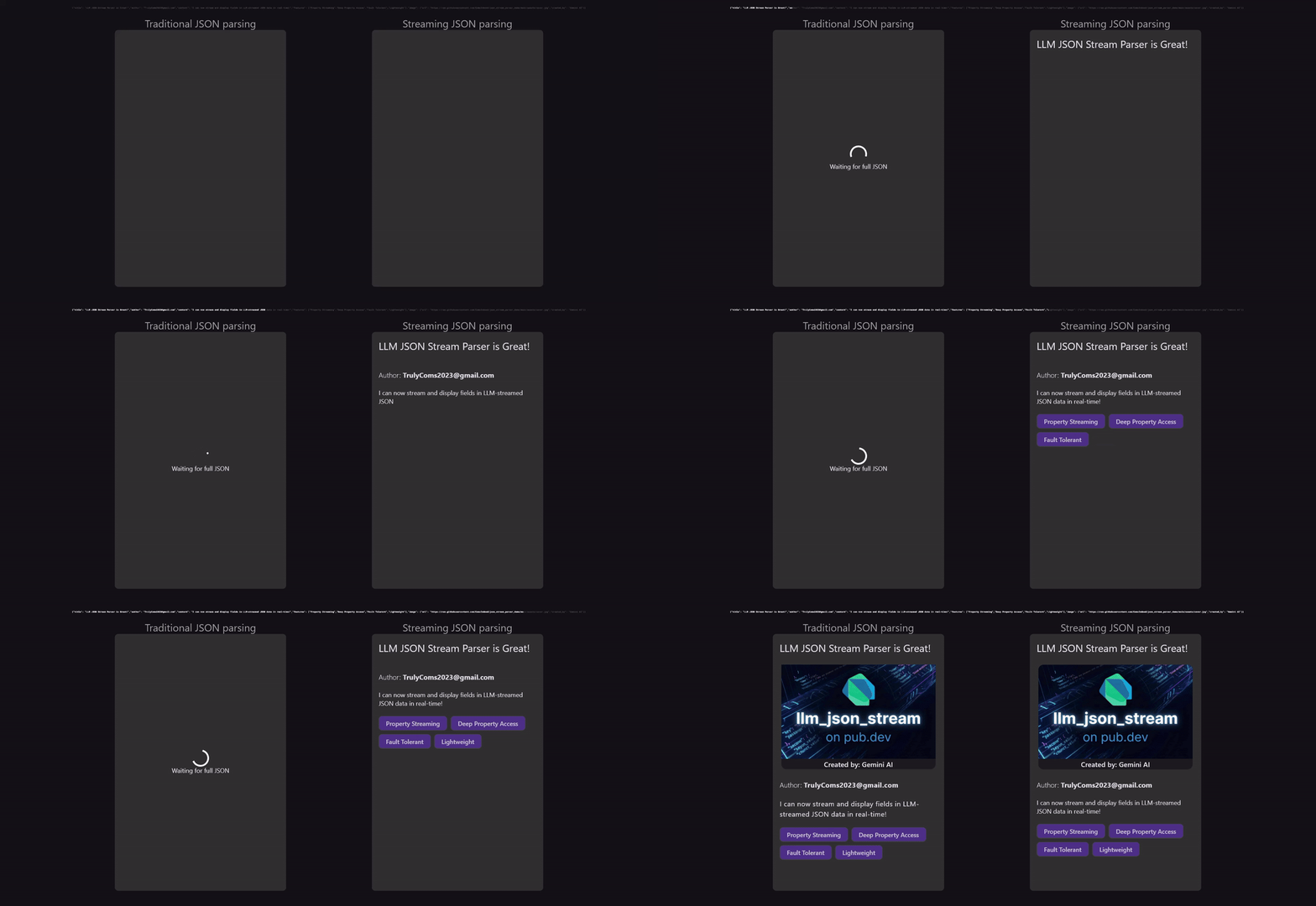
LLM APIs stream responses token-by-token. When the response is JSON, you get incomplete fragments:

jsonDecode() fails on partial JSON. Your options aren't great:
| Approach | Problem |
|---|---|
| Wait for complete response | High latency, defeats streaming |
| Display raw chunks | Broken JSON in your UI |
| Build a custom parser | Complex, error-prone, weeks of work |
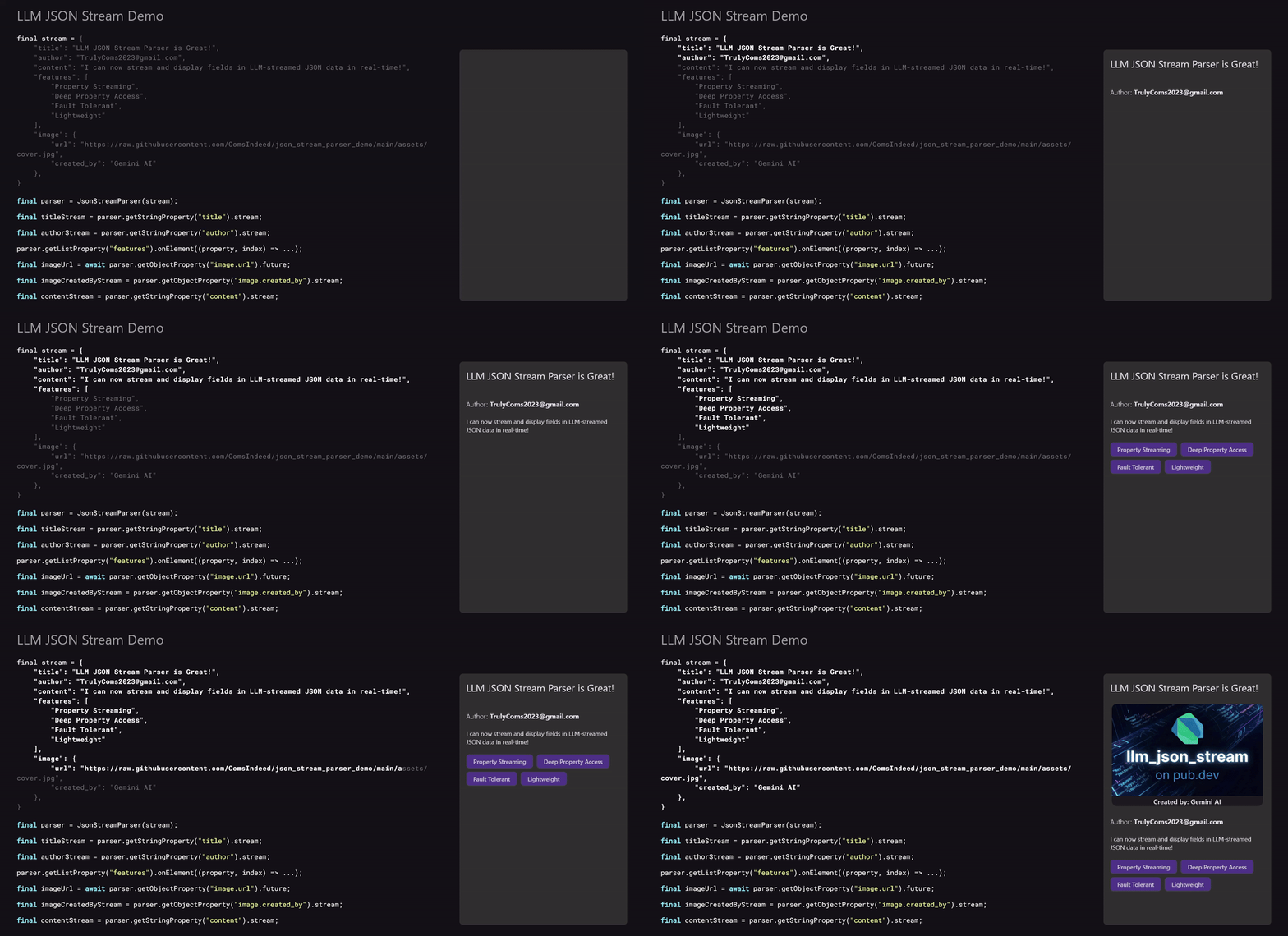
LLM JSON Stream parses JSON character-by-character as it arrives, allowing you to subscribe to specific properties and react to their values the moment they're available.
Instead of waiting for the entire JSON response to complete, you can:
- Display text fields progressively as they stream in
- Add list items to your UI the instant they begin parsing
- Await complete values for properties that need them (like IDs or flags)
# pubspec.yaml
dependencies:
  llm_json_stream: ^0.4.0
import 'package:llm_json_stream/llm_json_stream.dart';
final parser = JsonStreamParser(llmResponseStream);
// Stream text as it types
parser.getStringProperty('message').stream.listen((chunk) {
displayText += chunk; // Update UI character-by-character
});
// Or get the complete value
final title = await parser.getStringProperty('title').future;
// Clean up when done
await parser.dispose();Every property gives you both a stream (incremental updates) and a future (complete value):
final title = parser.getStringProperty('title');

title.stream.listen((chunk) => ...);  // Each chunk as it arrives
final complete = await title.future; // The final value| Use case | API |
|---|---|
| Typing effect, live updates | .stream |
| Atomic values (IDs, flags, counts) | .future |
Navigate JSON with dot notation and array indices:
parser.getStringProperty('title')                    // Root property
parser.getStringProperty('user.name')                // Nested object
parser.getStringProperty('items[0].title')           // Array element
parser.getNumberProperty('data.users[2].age') // Deep nestingDisplay text as the LLM generates it, creating a smooth typing effect:
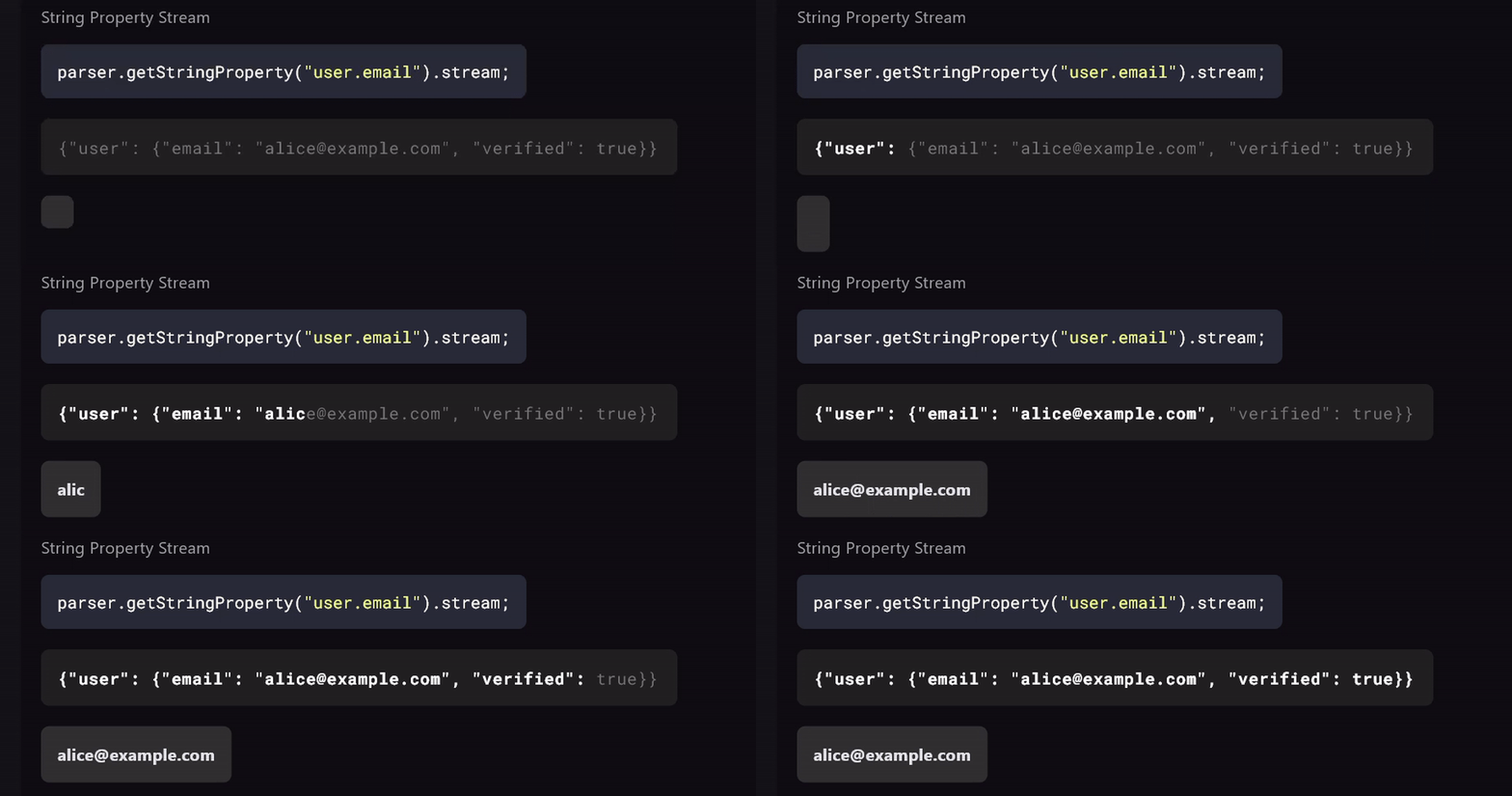
parser.getStringProperty('response').stream.listen((chunk) {
  setState(() => displayText += chunk);
});An underrated but powerful feature. Add items to your UI the instant parsing begins—even before their content arrives:
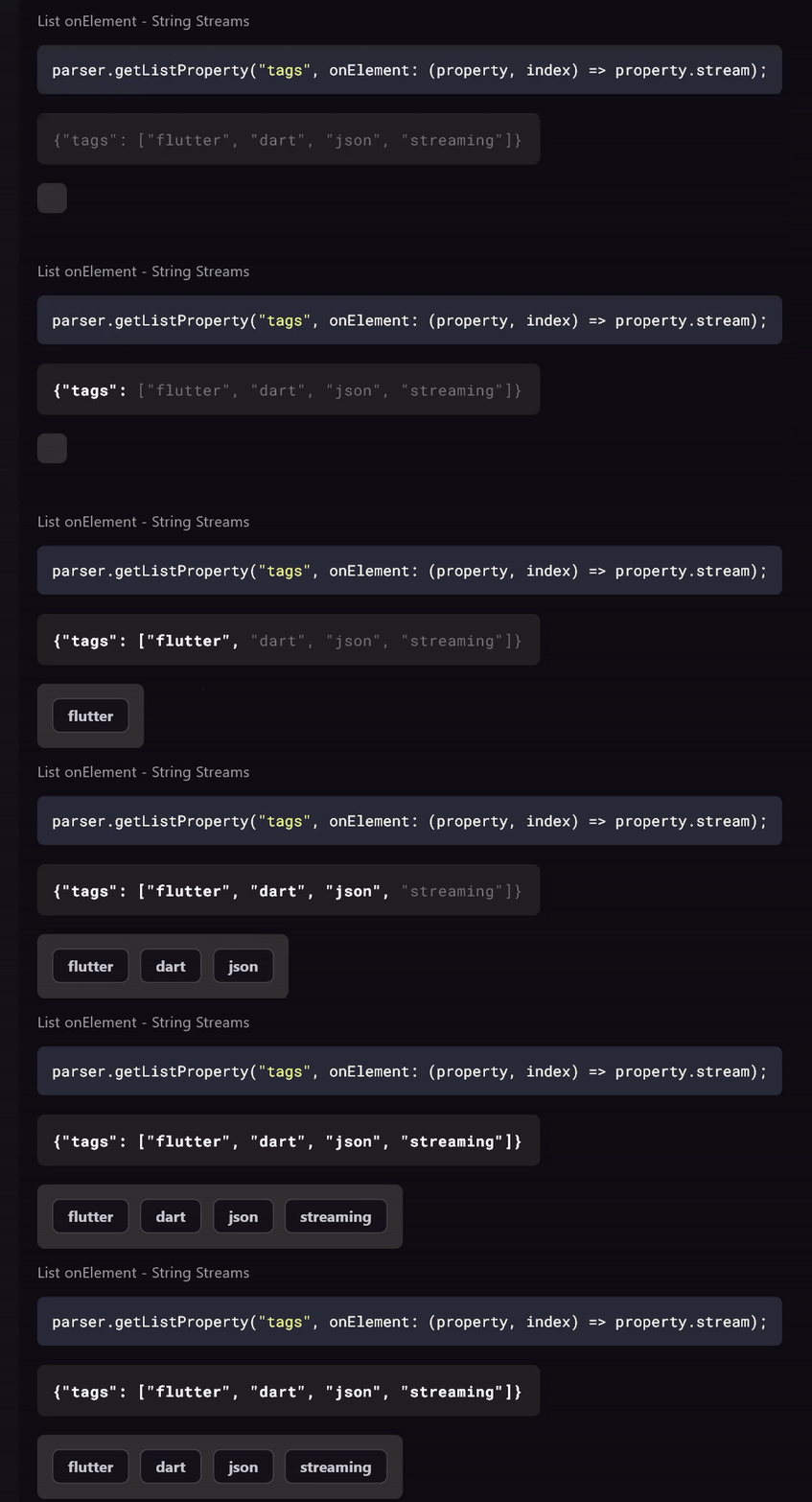
parser.getListProperty('articles').onElement((article, index) {
  // Fires IMMEDIATELY when "[{" is detected
  setState(() => articles.add(ArticleCard.loading()));

  // Fill in content as it streams
  article.asMap.getStringProperty('title').stream.listen((chunk) {
    setState(() => articles[index].title += chunk);
  });
});
Traditional parsers wait for complete objects → jarring UI jumps.
This approach → smooth loading states that populate progressively.
Similar to lists, maps support an onProperty callback that fires when each property starts parsing:
parser.getMapProperty('user').onProperty((property, key) {
  // Fires IMMEDIATELY when a property key is discovered
  print('Property "$key" started parsing');

  // Subscribe to the property value as it streams
  if (property is StringPropertyStream) {
    property.stream.listen((chunk) {
      setState(() => userFields[key] = (userFields[key] ?? '') + chunk);
    });
  }
});
This enables building reactive forms or detail views that populate field-by-field as data arrives.
parser.getStringProperty('name')      // String → streams chunks
parser.getNumberProperty('age')       // Number → int or double
parser.getBooleanProperty('active')   // Boolean
parser.getNullProperty('deleted')     // Null
parser.getMapProperty('config')       // Object → Map<String, dynamic>
parser.getListProperty('tags') // Array → List<dynamic>Navigate complex structures with a fluent interface:
// Chain getters together
final user = parser.getMapProperty('user');
final name = await user.getStringProperty('name').future;
final email = await user.getStringProperty('email').future;

// Or go deep in one line
final city = await parser.map('user').map('address').str('city').future;

// Or be normal
final age = await parser.str('user.age').future;Handle dynamic list elements with type casts:
parser.getListProperty('items').onElement((element, index) {
  element.asMap.getStringProperty('title').stream.listen(...);
  element.asMap.getNumberProperty('price').future.then(...);
});
Available: .asMap, .asList, .asStr, .asNum, .asBool, .asNull
Property streams offer two modes to handle different subscription timing scenarios:
final items = parser.getListProperty('items');

// Recommended: Buffered stream (replays latest value to new subscribers)
items.stream.listen((list) {
  // Will receive the LATEST state immediately, then continue with live updates
  // Safe for late subscriptions - no race conditions!
});

// Alternative: Unbuffered stream (live only, no replay)
items.unbufferedStream.listen((list) {
  // Only receives values emitted AFTER subscription
  // Use when you explicitly want live-only behavior
});| Stream Type | Behavior | Use Case |
|---|---|---|
.stream |
Replays latest value, then live | Recommended — prevents race conditions |
.unbufferedStream |
Live values only, no replay | When you need live-only behavior |
Memory efficient: Maps and Lists only buffer the latest state (O(1) memory), not the full history. Strings buffer chunks for accumulation.
This applies to StringPropertyStream, MapPropertyStream, and ListPropertyStream.
Some LLMs "yap" after the JSON—adding explanatory text that can confuse downstream processing. The closeOnRootComplete option stops parsing the moment the root JSON object/array is complete:
final parser = JsonStreamParser(
  llmStream,
  closeOnRootComplete: true,  // Stop after root JSON completes
);

// Input: '{"data": 123} Hope this helps! Let me know if you need anything else.'
// Parser stops after '}' — the trailing text is ignored
This is especially useful when:
- Your LLM tends to add conversational text after JSON
- You want to minimize processing overhead
- You're building a pipeline where only the JSON matters
Monitor parsing events in real-time with the onLog callback. Useful for debugging, analytics, or building parsing visualizers:
final parser = JsonStreamParser(
  llmStream,
  onLog: (event) {
    print('[${event.type}] ${event.propertyPath}: ${event.message}');
  },
);

// Output:
// [rootStart] : Started parsing root object
// [mapKeyDiscovered] : Discovered key: name
// [propertyStart] name: Started parsing property: name (type: String)
// [stringChunk] name: Received string chunk
// [propertyComplete] name: Property completed: name
// [propertyComplete] : Map completed:
Available event types:
rootStart— Root object/array parsing beganmapKeyDiscovered— A new key was found in an objectlistElementStart— A new element was found in an arraypropertyStart— Property value parsing beganpropertyComplete— Property value parsing completedstringChunk— String chunk receivedyapFiltered— Parsing stopped due to yap filter
You can also attach log listeners to specific properties:
parser.getMapProperty('user').onLog((event) {
  // Only receives events for 'user' and its descendants
  print('User event: ${event.type}');
});A realistic scenario: parsing a blog post with streaming title and reactive sections.
import 'package:llm_json_stream/llm_json_stream.dart';

void main() async {
  // Your LLM stream (OpenAI, Claude, Gemini, etc.)
  final stream = llm.streamChat("Generate a blog post as JSON");

  final parser = JsonStreamParser(stream);

  // Title streams character-by-character
  parser.getStringProperty('title').stream.listen((chunk) {
    print(chunk);  // "H" "e" "l" "l" "o" " " "W" "o" "r" "l" "d"
  });

  // Sections appear the moment they start
  parser.getListProperty('sections').onElement((section, index) {
    print('Section $index detected!');

    section.asMap.getStringProperty('heading').stream.listen((chunk) {
      print('  Heading chunk: $chunk');
    });

    section.asMap.getStringProperty('body').stream.listen((chunk) {
      print('  Body chunk: $chunk');
    });
  });

  // Wait for completion
  final allSections = await parser.getListProperty('sections').future;
  print('Done! Got ${allSections.length} sections');

  await parser.dispose();
}| Shorthand | Full Name | Returns |
|---|---|---|
.str(path) |
.getStringProperty(path) |
StringPropertyStream |
.number(path) |
.getNumberProperty(path) |
NumberPropertyStream |
.bool(path) |
.getBooleanProperty(path) |
BooleanPropertyStream |
.nil(path) |
.getNullProperty(path) |
NullPropertyStream |
.map(path) |
.getMapProperty(path) |
MapPropertyStream |
.list(path) |
.getListProperty(path) |
ListPropertyStream |
.stream           // Stream<T> — buffered, replays past values to new subscribers
.unbufferedStream // Stream<T> — live only, no replay (available on String, Map, List)
.future // Future<T> — completes with final value.onElement((element, index) => ...) // Callback when element parsing starts.onProperty((property, key) => ...) // Callback when property parsing starts.asMap // → MapPropertyStream
.asList // → ListPropertyStream
.asStr // → StringPropertyStream
.asNum // → NumberPropertyStream
.asBool // → BooleanPropertyStreamAlways dispose the parser when you're done:
await parser.dispose();JsonStreamParser(
Stream<String> stream, {
bool closeOnRootComplete = false, // Stop parsing after root JSON completes
void Function(ParseEvent)? onLog, // Global log callback for all events
});Battle-tested with 504 tests. Handles real-world edge cases:
| Category | What's Covered |
|---|---|
| Escape sequences | \", \\, \n, \t, \r, \uXXXX |
| Unicode | Emoji 🎉, CJK characters, RTL text |
| Numbers | Scientific notation (1.5e10), negative, decimals |
| Whitespace | Multiline JSON, arbitrary formatting |
| Nesting | 5+ levels deep |
| Scale | 10,000+ element arrays |
| Chunk boundaries | Any size, splitting any token |
| LLM quirks | Trailing commas, markdown wrappers (auto-stripped) |
OpenAI
final response = await openai.chat.completions.create(
  model: 'gpt-4',
  messages: messages,
  stream: true,
);

final jsonStream = response.map((chunk) =>
  chunk.choices.first.delta.content ?? ''
);

final parser = JsonStreamParser(jsonStream);
Anthropic Claude
final stream = anthropic.messages.stream(
  model: 'claude-3-opus',
  messages: messages,
);

final jsonStream = stream.map((event) => event.delta?.text ?? '');
final parser = JsonStreamParser(jsonStream);
Google Gemini
final response = model.generateContentStream(prompt);
final jsonStream = response.map((chunk) => chunk.text ?? '');
final parser = JsonStreamParser(jsonStream);Contributions welcome!
- Check open issues
- Open an issue before major changes
- Run
dart testbefore submitting - Match existing code style
MIT — see LICENSE