


- [Nov. 24, 2025] We release inference code of Fin3R.
Fin3R is a fine-tuning method designed to enhance the geometric accuracy and robustness of feed-forward 3D reconstruction models, while preserving their multi-view capability.
First, clone this repository to your local machine, and install the dependencies (torch, torchvision, numpy, Pillow, and huggingface_hub).
git clone git@github.com:Visual-AI/Fin3R.git
cd Fin3R
pip install -r requirements.txt
You just need to apply lora weight by a single line of code.
model.apply_lora(lora_path = 'checkpoints/vggt_lora.pth')
Following VGGT demo, you can use it by:
import torch
from vggt.models.vggt import VGGT
from vggt.utils.load_fn import load_and_preprocess_images

device = "cuda" if torch.cuda.is_available() else "cpu"
# bfloat16 is supported on Ampere GPUs (Compute Capability 8.0+)
dtype = torch.bfloat16 if torch.cuda.get_device_capability()[0] >= 8 else torch.float16

# Initialize the model and load the pretrained weights.
# This will automatically download the model weights the first time it's run, which may take a while.
model = VGGT.from_pretrained("facebook/VGGT-1B").to(device)

# Add Fin3R Lora weight here!
model.apply_lora(lora_path = 'checkpoints/vggt_lora.pth')

# Load and preprocess example images (replace with your own image paths)
image_names = ["path/to/imageA.png", "path/to/imageB.png", "path/to/imageC.png"]
images = load_and_preprocess_images(image_names).to(device)

with torch.no_grad():
    with torch.cuda.amp.autocast(dtype=dtype):
        # Predict attributes including cameras, depth maps, and point maps.
        predictions = model(images)
The VGGT weights will be automatically downloaded from Hugging Face. If you encounter issues such as slow loading, you can manually download them here and load, or:
model = VGGT()
_URL = "https://huggingface.co/facebook/VGGT-1B/resolve/main/model.pt"
model.load_state_dict(torch.hub.load_state_dict_from_url(_URL))
model.apply_lora(lora_path = 'checkpoints/vggt_lora.pth')Following Pi3 evaluation code. The pointmap estimation results from two heads are as following:
| Method | DTU | |||||
|---|---|---|---|---|---|---|
| Acc. Mean | Acc. Med. | Comp. Mean | Comp. Med. | N.C. Mean | N.C. Med. | |
| VGGT cam+depth | 1.298 | 0.754 | 1.964 | 1.033 | 0.666 | 0.752 |
| Fin3R cam+depth | 1.124 | 0.630 | 1.626 | 0.624 | 0.678 | 0.768 |
| VGGT pointmap | 1.184 | 0.713 | 2.224 | 1.297 | 0.694 | 0.777 |
| Fin3R pointmap | 0.978 | 0.530 | 1.934 | 0.891 | 0.697 | 0.785 |
| Method | ETH3D | |||||
|---|---|---|---|---|---|---|
| Acc. Mean | Acc. Med. | Comp. Mean | Comp. Med. | N.C. Mean | N.C. Med. | |
| VGGT cam+depth | 0.285 | 0.195 | 0.338 | 0.213 | 0.834 | 0.931 |
| Fin3R cam+depth | 0.234 | 0.143 | 0.202 | 0.113 | 0.853 | 0.970 |
| VGGT pointmap | 0.292 | 0.197 | 0.365 | 0.224 | 0.843 | 0.935 |
| Fin3R pointmap | 0.232 | 0.144 | 0.202 | 0.118 | 0.857 | 0.968 |
Checkpoints for DUSt3R, MASt3R, CUT3R and VGGT can be found at Google Drive.
Based on the original demo provided by VGGT, we also provide multiple ways to visualize your 3D reconstructions. Before using these visualization tools, install the required dependencies:
pip install -r requirements_demo.txtPlease note: VGGT typically reconstructs a scene in less than 1 second. However, visualizing 3D points may take tens of seconds due to third-party rendering, independent of VGGT's processing time. The visualization is slow especially when the number of images is large.
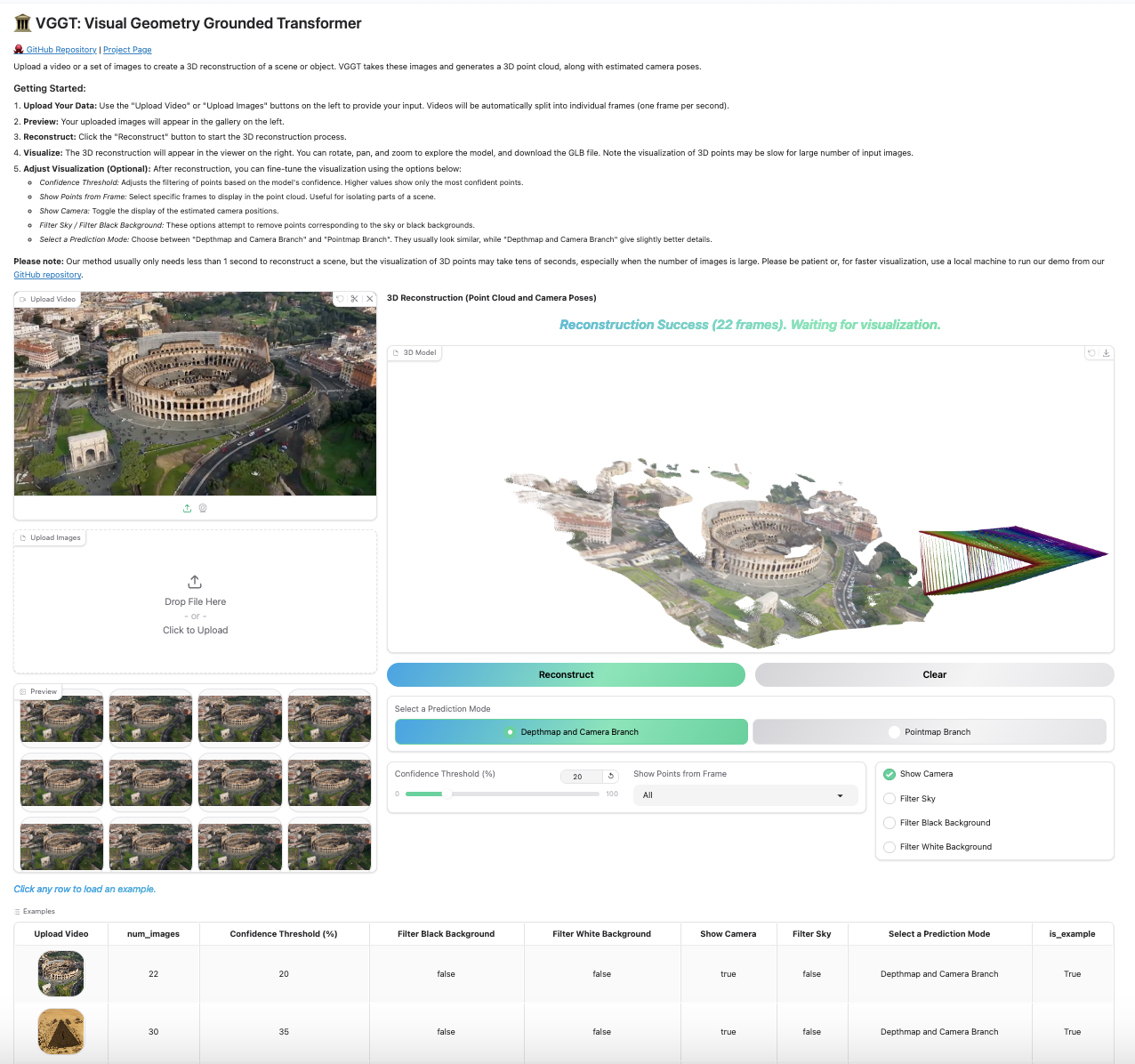
Our Gradio-based interface allows you to upload images/videos, run reconstruction, and interactively explore the 3D scene in your browser. You can launch this in your local machine or try it on Hugging Face.
python demo_gradio.pyClick to preview the Gradio interactive interface
Run the following command to run reconstruction and visualize the point clouds in viser. Note this script requires a path to a folder containing images. It assumes only image files under the folder. You can set --use_point_map to use the point cloud from the point map branch, instead of the depth-based point cloud.
python demo_viser.py --image_folder path/to/your/images/folderThanks to these great repositories: PoseDiffusion, VGGSfM, DINOv2, DUSt3r, MASt3R, CUT3R,Monst3r, VGGT, Moge, PyTorch3D, Sky Segmentation, Depth Anything V2, and many other inspiring works in the community.
- Release the Evaluation code
- Release the training code
All our model follows original license of each method. For example, for finetuned VGGT, see the LICENSE file for details.
For any question, please contact weining@connect.hku.hk. If you find this work useful, please cite
@inproceedings{ren2025fin3r,
  title={Fin3R: Fine-tuning Feed-forward 3D Reconstruction Models via Monocular Knowledge Distillation},
  author={Ren, Weining and Wang, Hongjun and Tan, Xiao and Han, Kai},
  booktitle={The Thirty-ninth Annual Conference on Neural Information Processing Systems},
  year={2025}
}