WUProxy Plugin Documentation
WUProxy is the plugin which allows Windows XP and Windows 2000 to connect to the new Windows Update endpoint without having troubles with SHA-256.
Important note: The WUPlugin is contained in every release but is enabled only in the WU release. It will be harder to configure it under a normal release, so if you plan to use the WUPlugin, please use the WU Release instead of the Default Release
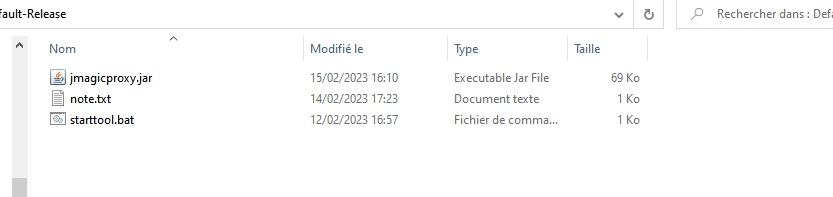
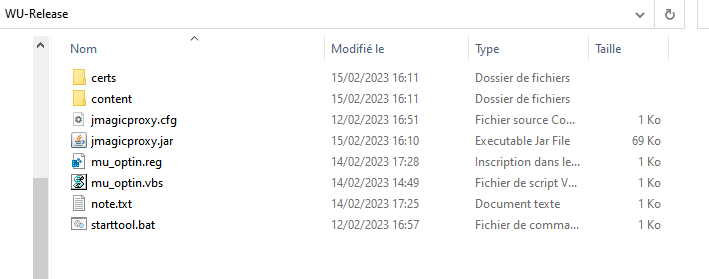
To determine if you are using the Default release or the WU release, here are images for the comparison.
Default-Release:
WU-Release:
Configuration keys:
In the configuration, one key is used by this plugin.
- proxy.plugin.wuproxy.redirectjs: Determine where to find the redirect.js file. This file will replace the one contained in the Windows Update website in order to prevent loop redirection.
Setup instructions:
These instructions only applies under the WU-Release. If you chose the Default-Release you have to do configure it correctly first.
Note: The proxy itself must be installed in your host, not in the machine which needs to have a working Windows Update !
Common instructions:
Because Windows 2000 and Windows XP uses old algorithms, you have to allow Java to use them as they were disabled for security reasons.
- Navigate to the folder where your Java runtime is installed (Something like C:\Program Files\Java\jre1.8.0_xxx)
- Once you found this folder, navigate to lib and then security.
- Do a backup of the file java.security (You can call it something like java.security.bak)
- Open java.security with a text editor in administrator mode
- Go find the line
jdk.tls.disabledAlgorithms=........... - Replace it so it is exactly only
jdk.tls.disabledAlgorithms=
At the end, it should look like that:

Configuration instructions for different operating systems: