log.q
This library is inspired by Java's slf4j and similar logging systems providing a simple console logger with the following features:
- Consistent logging information
- Configurable log level support from TRACE to FATAL
- Multiple logging formats
- Basic logging
- Color logging for WARN, ERROR and FATAL log levels
-
syslogcompatible logging - JSON logging
- Custom logging functions
- slf4j-style parameterised messages
The library uses a standard logging format for each line that is printed to the terminal:
- Date and time (
.time.today[]and.time.nowAsTime[]) - Log level (one of
TRACE,DEBUG,INFO,WARN,ERROR,FATAL) - Process identifier (
pid-*pid*) - Current user (
.z.u) - Current handle (
.z.w)
The log message can be supplied in 2 formats:
- String (
10h) - Generic list (
0h)- Supports slf4j-style parameterised logging -
{}to indicate parameters within the log message to replace with the objects - Format:
("string message with the same number of {} as other objects in this list"; object-1; object-2) - See Parameterised Logging below for more detail
- Supports slf4j-style parameterised logging -
An example informational message:
/ Basic string logging
q) .log.info "An info message"
2017.03.06 15:23:41.453 INFO pid-14448 jasra_000 0 An info message

/ Parameterised logging
q) .log.info ("A random symbol - {}"; rand `4)
2021.01.30 14:49:35.821 INFO pid-402 jas 0 A random symbol - milgBy default when the log library is initialised, it defaults to INFO. If the process is started in debug mode, which is defined by using the -e command line argument, the level is set to DEBUG.
The configured log level is printed when the library is initialised:
Logging enabled [ Level: INFO ] [ Current Logger: `.log.loggers.basic ]
You can use .log.setLevel to change it as necessary post initialisation.
The following loggers are supplied by default:
-
.log.loggers.basic: Simple space-separated logging -
.log.loggers.color: Space-separated logging with color highlighting for WARN, ERROR and FATAL levels -
.log.loggers.syslog:syslogcompatible space-separated logging -
.log.loggers.json: JSON formatted logging
By default, the basic logger will be enabled but the other loggers can be selected by the following:
-
.log.loggers.color: If the environment variableKDB_COLORSor the command line argument-logColorsis specified -
.log.loggers.syslog: If the environment variableKDB_LOG_SYSLOGor the command line argument-logSyslogis specified -
.log.loggers.json: If the environment variableKDB_LOG_JSONor the command line argument-logJsonis specified
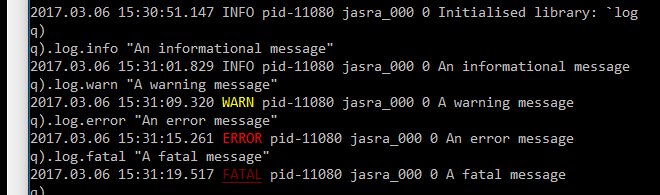
For example, color output looks as follows:
By default, the process is identified by its PID, in the form pid-*pid*. However, you can change it any point to be more descriptive by setting .log.process:
q) .log.info "Hi"

q).log.info "Hi"
2018.08.24 15:36:02.709 INFO pid-87646 jrajasansir 0 Hi
q) .log.process:"myProcess"
q) .log.info "Hi again"
2018.08.24 15:36:31.161 INFO myProcess jrajasansir 0 Hi again
To add your own logger, you must modify the dictionary .log.cfg.loggers:
- The key of the dictonary is a symbol reference to the logging function to use
- The value of the dictionary is a function that determines when the function should be used
NOTE: That the first function that returns true will be the logger selected.
The logging function defined must accept the following 3 arguments:
-
fd: The file descriptor to output the log line -
lvl: The log level of the current message as a symbol (e.g.`INFO) -
message: The log message as a string
Once the configuration dictionary has been modifed, call .log.setLogger.
q) .jas.customLogger:{[fd; lvl; message] -1 " " sv ("Logging: ";string lvl;message) };

/ Make .jas.customLogger the first entry in the config dictionary and always be used
q) .log.cfg.loggers:(enlist[`.jas.customLogger]!enlist { 1b }),.log.cfg.loggers;
q) .log.setLogger[];

Logging enabled [ Level: INFO ] [ Current Logger: `.jas.customLogger ]

q) .log.info "A log message";
Logging:  INFO A log message
The log library supports parameterised logging - whereby the objects to log are only stringified if the log line is actually going to emitted to standard out / standard error.
Following the convention from slf4j, {} is used in the string message to signal where the stringified version of the objects should be inserted.
You must ensure that the number of brace pairs matches the number of objects supplied after the string message. The log library does not validate this before attempting to log.
The main advantage of switching to this mechanism is the performance improvement when the specified log level is disabled.
For example - when logging a table to a disabled log level, the log line is executed ~99% faster than the previous version. More execution comparisons can be found in the original pull request.