Skip to content
Open
Show file tree
Hide file tree
Changes from 3 commits
Commits
File filter

Filter by extension

Filter by extension

Conversations
Failed to load comments.
Loading
Jump to
Jump to file
Failed to load files.
Loading
Diff view
Diff view
25 changes: 19 additions & 6 deletions components/bl-autocomplete-component/README.md
Original file line number Diff line number Diff line change
@@ -1,19 +1,32 @@
# Autocomplete

Autocomplete is a component of Backendless UI-Builder designer. This allows you to select an item from a list of options.
Autocomplete is the component of Backendless UI-Builder designer. It allows selecting one of the options from the list.

<p align="center">
<img src="./thumbnail.png" alt="main thumbnail" width="780"/>
<img src="./example-images/thumbnail.png" alt="main thumbnail" width="780"/>
</p>

All options are stored in a JSON object, that can be set either by using UI-Builder settings or Codeless Logic. You can also group options by passing a list containing JSON objects to the component:

<p align="center">
<img src="./example-images/autocomplete_component_1.png" alt="Array of objects" width="780"/>
</p>
Comment on lines +9 to +13
Copy link
Contributor

Choose a reason for hiding this comment

The reason will be displayed to describe this comment to others. Learn more.

Move it to example section.

Also will be good to change image of JSON for real text JSON hidden under spoiler.


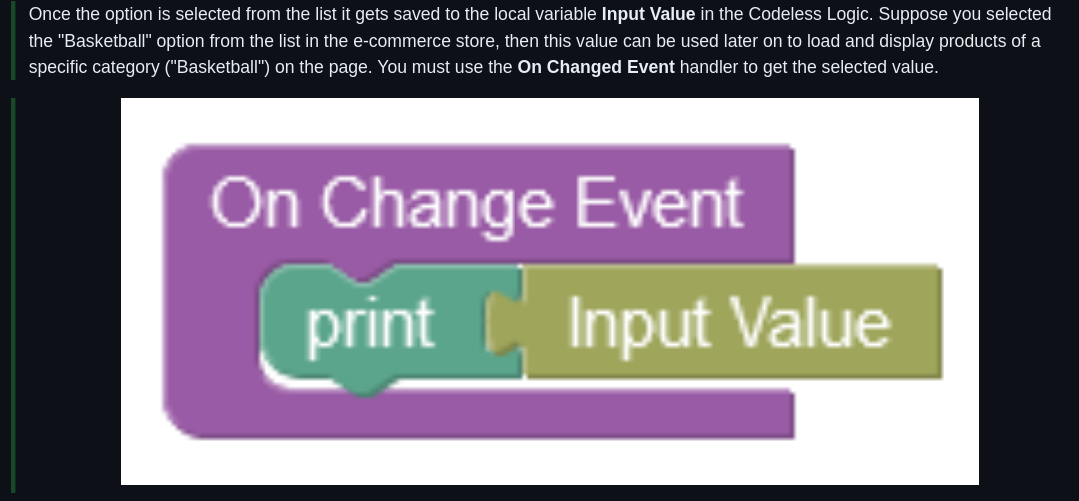
Once the option is selected from the list it gets saved to the local variable **Input Value** in the Codeless Logic. Suppose you selected the "Basketball" option from the list in the e-commerce store, then this value can be used later on to load and display products of a specific category ("Basketball") on the page. You must use the **On Changed Event** handler to get the selected value.
Copy link
Contributor

Choose a reason for hiding this comment

The reason will be displayed to describe this comment to others. Learn more.

local variable Input Value

It's not completely correct. Better to say something like: we could access changed value from input value context codeless block

Copy link
Contributor

Choose a reason for hiding this comment

The reason will be displayed to describe this comment to others. Learn more.

Suppose you selected the "Basketball"

Better to use options that we already use before(months from another example).

Copy link
Contributor

Choose a reason for hiding this comment

The reason will be displayed to describe this comment to others. Learn more.

You must use the On Changed Event

Typo - Changed -> Change


<p align="center">
<img src="./example-images/autocomplete_component_2.png" alt="On Changed Handler" width="780"/>
</p>
Comment on lines +17 to +19
Copy link
Contributor

Choose a reason for hiding this comment

The reason will be displayed to describe this comment to others. Learn more.

I'm not completely sure if this image is useful. But if you think so, we should change width property(or remove it) in markdown. For now it looks not pretty good.

image


## Properties

| Property | Type | Default Value | Logic | Data Binding | UI Setting | Description |
|---------------------------------------------|--------------------------------------------------------------------------|-----------------------------------------------------------------------------------------------------------------------------------------------------------------------------------------------------------------------------------------------------------------------------------------------------------------------------------------------------------------|---------------------------|--------------|------------|--------------------------------------------------------------------------------------------------------------------------------------------------------------------------------------------------------------------------------------------------------------------------------------------------------------------------|
| Disabled<br/>`disabled` | Checkbox | `false` | Disabled Logic | YES | YES | This handler allows you to disable a component. |
| Placeholder<br/>`placeholder` | Text | "Placeholder" | Placeholder Logic | YES | YES | This handler allows you to specify a label of autocomplete component. |
| Empty Options Label<br/>`emptyOptionsLabel` | Text | "No options" | Empty Options Label Logic | YES | YES | This handler allows you to add a label that will be displayed when the dropdown menu is empty. |
| Variant<br/>`variant` | Select [Outlined:`outlined`<br/>Standart:`standart`<br/>Filled:`filled`] | Outlined:`outlined` | Variant Logic | YES | YES | This handler allows you to specify the variant of autocomplete. |
| Disabled<br/>`disabled` | Checkbox | `false` | Disabled Logic | YES | YES | This handler allows disabling a component. |
| Placeholder<br/>`placeholder` | Text | "Placeholder" | Placeholder Logic | YES | YES | This handler allows specifying a label of autocomplete component. |
| Empty Options Label<br/>`emptyOptionsLabel` | Text | "No options" | Empty Options Label Logic | YES | YES | This handler allows adding a label that will be displayed when the dropdown menu is empty. |
| Variant<br/>`variant` | Select [Outlined:`outlined`<br/>Standart:`standart`<br/>Filled:`filled`] | Outlined:`outlined` | Variant Logic | YES | YES | This handler allows specifying the variant of the autocomplete. |
| Options<br/>`options` | JSON | `[`<br/>`{"groupLabel":"Winter",`<br/>`"children": [{"label": "December", "value": "December"},{"label": "January", "value": "January"},{"label": "February", "value": "February"}]},`<br/>`{"groupLabel": "Summer",`<br/>`"children": [{"label": "June", "value": "June"},{"label": "July", "value": "July"},{"label": "August", "value": "August"}]}`<br/>`]` | Options Logic | YES | YES | This handler allows you to add options to be displayed in the options list. Watch [Codeless Examples](#examples). Signature of options: list of objects `{value: String, label: String}`. Signature of grouped options: list of objects `{groupLabel: String, children: list of objects {value: String, label: String}}` |

## Events
Expand Down
Loading
Sorry, something went wrong. Reload?
Sorry, we cannot display this file.
Sorry, this file is invalid so it cannot be displayed.
Loading
Sorry, something went wrong. Reload?
Sorry, we cannot display this file.
Sorry, this file is invalid so it cannot be displayed.